Project Overview
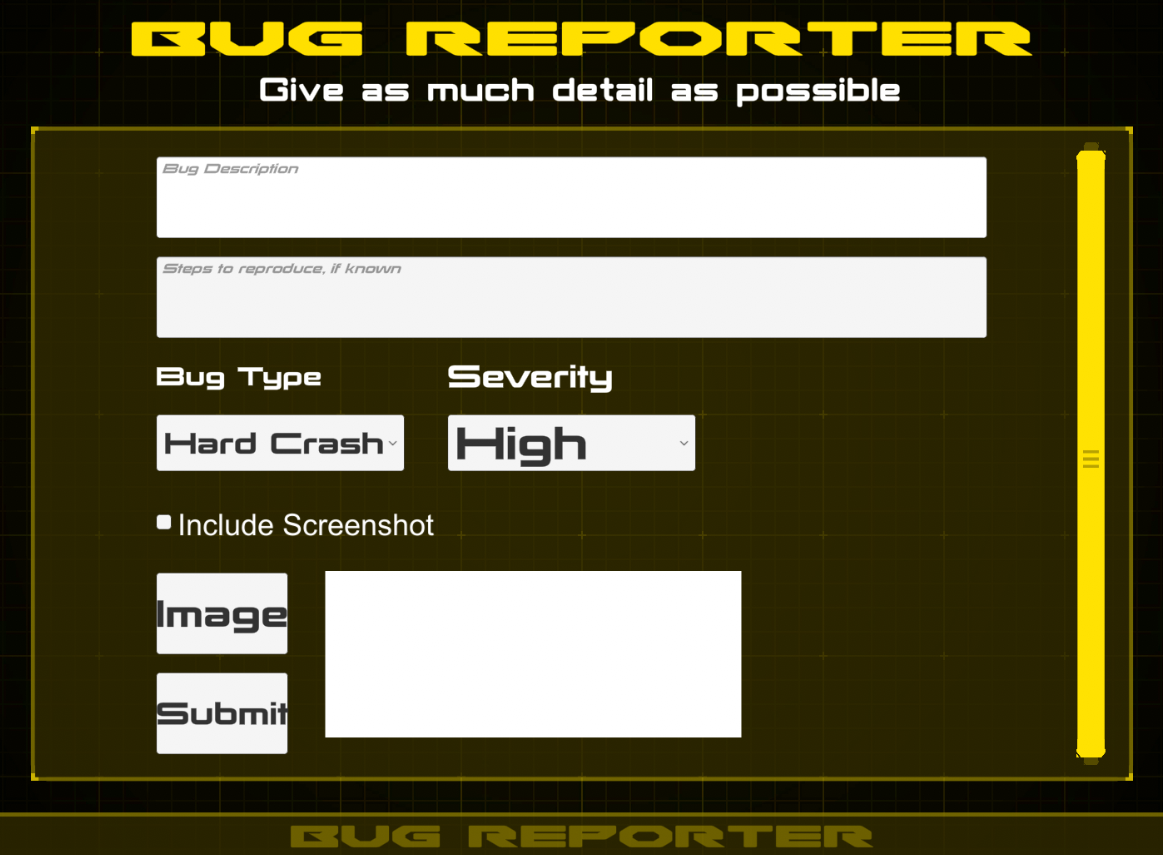
The aim of this project was to make bug reporting easier during development and testing by allowing reports to be submitted directly from the game rather than through an external tool or manual message.
On the Unity side, the system gathers report details such as description, reproduction steps, scene name, platform, version, severity, and optional screenshot data, then submits the information using a web request.
On the Discord side, a companion bot receives those reports and turns them into a more structured workflow, making it easier for developers to track, discuss, and resolve issues.
Key Features
- In-game bug submission directly from Unity
- Built in C# using Unity UI and UnityWebRequest
- Structured bug data sent through a Discord webhook
- Optional screenshot attachment support
- Automatic player/editor log collection
- Log compression before upload
- Bug categorisation by type and severity
- Discord bot workflow for tracking progress
- Automatic channel creation and report movement inside Discord
How the Workflow Works
The Unity script collects information entered by the player or tester, packages it into a formatted report,
and sends it to a Discord webhook using a WWWForm.
The report can include:
- Description: what went wrong.
- Steps to reproduce: how the issue happened.
- Scene and platform: runtime context for the report.
- Type and severity: classification for triage.
- Screenshot: optional image attachment.
- Log file: zipped player or editor log for debugging.
This makes the report more useful immediately, rather than relying on incomplete tester descriptions.
Discord Integration
I also created a Discord bot that monitors a dedicated report channel and expands the raw bug report into a more interactive workflow.
The bot recreates the report in a more structured format, creates a separate channel for the issue under a different category, and adds buttons that allow developers to update the report state.
Those controls make it easier to indicate whether the bug is being investigated, needs more information, or has been completed. Once the report is marked as done, it is moved into a different category so it can be treated as archived and resolved.
The bot is running on Railway, and the bot source code is available on GitHub.
Video Demo
Below is a short video showing the bug report system in use.
Implementation Notes
The Unity implementation supports file picking for screenshots on standalone platforms, runtime previewing of selected images, and compression of log files before upload.
It also includes practical workflow details like report cooldown timing, duplicate-send protection, and platform-specific log path resolution for editor and standalone builds.
These details make the tool more realistic and usable in a live development environment rather than being just a proof-of-concept form submission.
Code Example
Below is a representative excerpt from the Unity-side reporting script.
using System;
using System.IO;
using System.Collections;
using System.Text;
using UnityEngine;
using UnityEngine.UI;
using UnityEngine.Networking;
using TMPro;
using SFB;
using System.IO.Compression;
using System.Collections.Generic;

namespace DangryGames
{
    public class BugReporter : MonoBehaviour
    {
        [Header("UI References")]
        [SerializeField] private TMP_InputField descriptionField;
        [SerializeField] private TMP_InputField stepsField;
        [SerializeField] private Toggle includeScreenshotToggle;
        [SerializeField] private RawImage screenshotPreview;
        [SerializeField] private GameObject feedbackPanel;
        [SerializeField] private TMP_Dropdown dropdownType;
        [SerializeField] private TMP_Dropdown dropdownSeverity;

        [Header("Discord Settings")]
        [SerializeField] private string discordWebhookUrl = "YOUR_DISCORD_WEBHOOK_URL_HERE";

        [Header("Reporter Settings")]
        [SerializeField] private float reportCooldown = 30f;
        private float _lastReportTime = -999f;
        private bool _isSending = false;

        private Texture2D _selectedImageTexture;
        private byte[] _selectedImageBytes;

        private void Start()
        {
            string path = GetPlayerLogPath();
            Debug.Log("Log path resolved to: " + path);

            List<string> options = new List<string>
            {
                "Hard Crash", "SoftLock", "Framerate", "Audio", "Visual", "UI", "Gameplay", "Text", "Controls", "Resolution"
            };
            dropdownType.AddOptions(options);

            List<string> sevOptions = new List<string> { "High", "Medium", "Low" };
            dropdownSeverity.AddOptions(sevOptions);
        }

        public void SubmitBugReport()
        {
            if (_isSending)
            {
                Debug.LogWarning("Bug report already in progress.");
                return;
            }

            if (Time.time - _lastReportTime < reportCooldown)
            {
                float remaining = reportCooldown - (Time.time - _lastReportTime);
                Debug.LogWarning($"Please wait {remaining:F1} seconds before sending another bug report.");
                return;
            }

            if (string.IsNullOrWhiteSpace(descriptionField.text))
            {
                Debug.LogWarning("Bug description is empty.");
                return;
            }

            StartCoroutine(SendBugCoroutine());
        }

        private IEnumerator SendBugCoroutine()
        {
            _isSending = true;
            _lastReportTime = Time.time;

            string bugId = Guid.NewGuid().ToString().Substring(0, 8).ToUpper();
            string description = descriptionField.text;
            string steps = stepsField != null ? stepsField.text : string.Empty;
            string sceneName = UnityEngine.SceneManagement.SceneManager.GetActiveScene().name;
            string platform = Application.platform.ToString();
            string version = Application.version;
            string timeStamp = DateTime.Now.ToString("yyyy-MM-dd HH:mm:ss");
            string bugType = $"{dropdownType.options[dropdownType.value].text}";
            string bugSeverity = $"{dropdownSeverity.options[dropdownSeverity.value].text}";

            string content =
                $"**🐞 Bug Report — ID: `{bugId}`**\n" +
                $"**Description:** {description}\n" +
                $"**Steps:** {(string.IsNullOrWhiteSpace(steps) ? "_(none provided)_" : steps)}\n" +
                $"**Scene:** {sceneName}\n" +
                $"**Platform:** {platform}\n" +
                $"**Bug Type:** {bugType}\n" +
                $"**Severity:** {bugSeverity}\n" +
                $"**Version:** {version}\n" +
                $"**Time:** {timeStamp}";

            WWWForm form = new WWWForm();
            form.AddField("content", content);

            using (UnityWebRequest request = UnityWebRequest.Post(discordWebhookUrl, form))
            {
                yield return request.SendWebRequest();

#if UNITY_2020_1_OR_NEWER
                if (request.result == UnityWebRequest.Result.Success)
#else
                if (!request.isHttpError && !request.isNetworkError)
#endif
                {
                    Debug.Log($"Bug {bugId} sent to Discord successfully.");
                }
                else
                {
                    Debug.LogError("Failed to send bug report to Discord: " + request.error);
                }
            }

            _isSending = false;
        }
    }
}
What This Project Demonstrates
- Tooling inside Unity: Building practical QA and debugging tools directly into the game.
- Workflow integration: Connecting Unity reporting with Discord-based team processes.
- Automation: Turning raw bug reports into a more structured channel-based workflow.
- Useful debugging data: Capturing logs, screenshots, metadata, and classification details together.